
Microsoft 365 has become the go-to suite of tools and cloud services for Brisbane businesses. For good reason too – it ties in productivity, communications, security and much more through familiar apps like Microsoft Word, SharePoint and Teams, and new favourites like Copilot.
If you’re looking to jump on board, Smile IT is an official Microsoft partner offering Microsoft 365 setup and support. We can help you set up, migrate, secure and manage Microsoft 365, with practical advice on licensing and configuration.
If your business already uses Microsoft 365, we can improve your current setup and help with the ongoing administration of your tenancy.

When you move your business to Microsoft 365, it becomes indispensable to your operations. Business email, files, meetings and collaboration are all brought together through tools like Outlook, Teams, SharePoint and OneDrive. You use it day in and day out.
To get the most out of the tools Microsoft 365 offers, you want them to be configured correctly and managed properly moving forward. That’s what Smile It does.
Our Microsoft 365 consulting and support covers licensing, migrations, user management, security, backup and ongoing administration. If you need help with the whole environment or jus one part of the platform, we’re the team to call.
Start with the right Microsoft 365 setup and licences for your users. We can configure your Microsoft tenant, accounts, domains, email, permissions and licensing, so you won’t sign up to products your team doesn't need.
Moving from another email service, server or cloud platform? We plan and manage Microsoft 365 and Office 365 migrations, including supported mailboxes, users, calendars, contacts and business data.
Get ongoing help with user accounts, licences, Outlook, Exchange Online, permissions and Microsoft 365 administration. We can also troubleshoot problems and make configuration changes as your requirements develop.
Improve account and data protection with multi-factor authentication, Conditional Access, identity controls, email protection and other Microsoft 365 security features available within your environment.
Make Microsoft's collaboration tools easier to use. We can configure and support Microsoft Teams, SharePoint and OneDrive, including document storage, sharing, permissions and user access.
Add another layer of protection for important Microsoft 365 data. We can help with backup and recovery options for Exchange Online, OneDrive, SharePoint and other supported Microsoft 365 services.
Copilot is the AI assistant living within your Microsoft 365 tenancy. It brings the power of AI into familiar applications including Outlook, Teams, Word, Excel and PowerPoint.
Copilot will change how you work, but before rolling it out, it’s worth reviewing what sits behind it. User permissions, SharePoint access, Microsoft licensing and information access can all affect how Copilot works within your organisation. You want it set up correctly.
Smile IT can assess your Microsoft 365 environment and help prepare it for a practical Copilot rollout. We want to help you leverage this powerful technology without compromising your security. Let’s chat about how to do that.

We start with your existing email, users, files and Microsoft requirements. This helps us identify what needs to move, what can stay and any issues that should be addressed first.
We map out your Microsoft 365 licences, tenant configuration, security settings and migration approach, including how and when users will move across.
We configure Microsoft 365 and migrate the agreed mailboxes, users and supported data. The cutover is planned around your business to reduce interruption for staff.
Once the migration is complete, we configure user access, permissions, Microsoft applications and relevant security controls.
After the move, we can continue looking after Microsoft 365 administration, licensing, user changes and support requests.
If you currently use Microsoft 365 at your business but don’t feel like you’re getting the full benefit from it, let’s have a conversation about that. We can review how it’s currently configured and help sort out issues that have built up over time.
You might be paying for licenses you don’t need, there could be inconsistent user permissions; your SharePoint access could be all over the place. Whatever the issue, our techs can help you get back on track
We can then take care of your ongoing Microsoft 365 administration, including adding new users, removing departing staff, handling licence changes, mailbox configuration, permissions and account issues.
You get an easier-to-manage Microsoft environment that’s better suited to the way your team uses it.
Talk to our Brisbane team about your Microsoft tenancy and what you'd like to improve.
Our Brisbane team can help with Microsoft 365 licensing, migrations, administration, security and user issues, giving you a local point of contact for the platform.
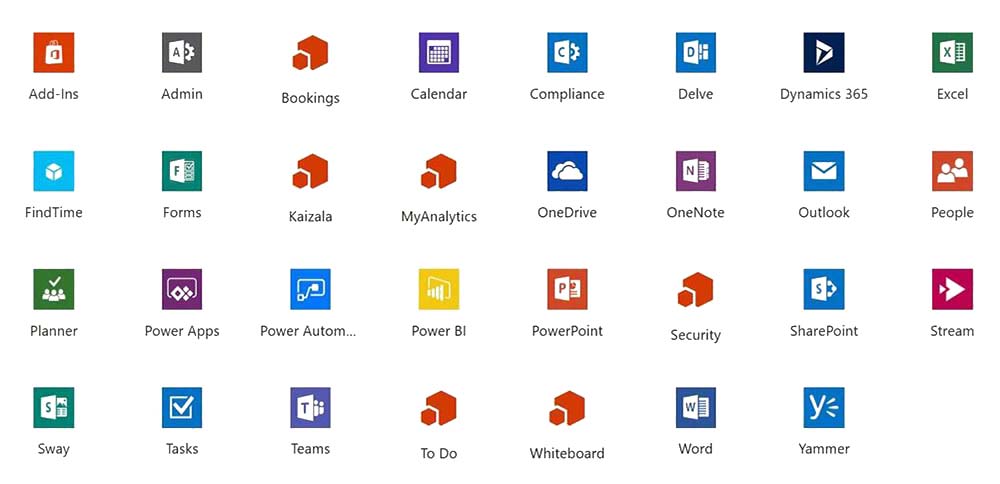
Microsoft 365 is much bigger than Outlook. We can help with Exchange Online, Teams, SharePoint, OneDrive, identity, security, backup and Copilot readiness.
Microsoft licensing can get confusing quickly. We’ll help you work out which licences and features make sense for your users rather than automatically recommending more.
Smile IT is ISO 27001 certified. This means we meet the stringent criteria of an independently recognised framework for how we manage information security across our organisation.
New starters, departing staff, licence changes and new Microsoft services all affect your setup. We can continue managing the Microsoft 365 environment as those requirements change.
Run business email and calendars through Microsoft’s cloud-based Exchange Online platform, with access across supported devices.
Use Teams for meetings, chat and collaboration, giving staff a central place to communicate and work together.
Give staff controlled access to documents and files without relying on local folders or sending multiple versions back and forth by email.
Microsoft 365 provides central controls for users, identities and permissions, helping you manage who can access business information.
Depending on your licensing, Microsoft 365 can provide identity, access, email and data protection features that help strengthen your Microsoft environment.
Bring Microsoft’s AI assistant into applications your team already uses, with the right licensing, permissions and information access in place first.

Microsoft 365 is Microsoft’s cloud platform for productivity and collaboration. Depending on your licence, it can include Outlook, Exchange Online, Word, Excel, PowerPoint, Teams, SharePoint, OneDrive and a range of identity and security features. Microsoft 365 was previously known as Office 365.
Yes. We provide Microsoft 365 migration services for Brisbane businesses moving from supported email systems, servers and cloud platforms.
Yes. Office 365 is the previous name commonly associated with Microsoft’s cloud productivity platform. We can help you move your business to the current Microsoft 365 environment from Office 365 and configure it correctly.
It depends on what your staff need to do. Different Microsoft 365 licences include different applications, storage, security and management capabilities. We can review your users and recommend licences based on the features they’ll use.
Yes. If Microsoft 365 is already running, we can review areas such as licensing, users, permissions, security settings, SharePoint access and general configuration.
Microsoft 365 provides its own retention and recovery capabilities, but they may not meet every organisation’s backup and retention requirements. We can assess the Microsoft services and data you use and help you choose an appropriate backup approach.
Yes. We provide Microsoft Teams and SharePoint support covering configuration, user access, permissions, document sharing and troubleshooting.
Yes. We can help configure Microsoft 365 security features including multi-factor authentication, Conditional Access, identity and access controls, email protection and user permissions. The features available will depend partly on your Microsoft licensing.
Yes. We can assess your Microsoft environment before Copilot is introduced, including licensing, user permissions, SharePoint access, security and information access.
This gives you a clearer picture of what needs attention before a wider Copilot rollout

Whether you’re moving to Microsoft 365, reviewing an existing setup or looking for ongoing Microsoft 365 support, talk to Smile IT about what you need.
Call 1300 766 720 or get in touch to discuss your Microsoft 365 environment.