
Microsoft 365 is powering the productivity and performance of Australian businesses of all sizes. If your business is one of them, you’ll understand the positive results that can be attained by switching to this platform.
But do you understand how your Microsoft environment works as a whole? And are you sure you’re leveraging it correctly? 56% of Microsoft 365 enterprise tenants are over-licensed and underutilised, according to one study.
We don’t want this to be your business. Today, we’re going to take a closer look at how to determine if your Microsoft tenant isn’t aligned with your business usage. Understanding what a Microsoft tenant is a key first step.
What is a Microsoft Tenant?
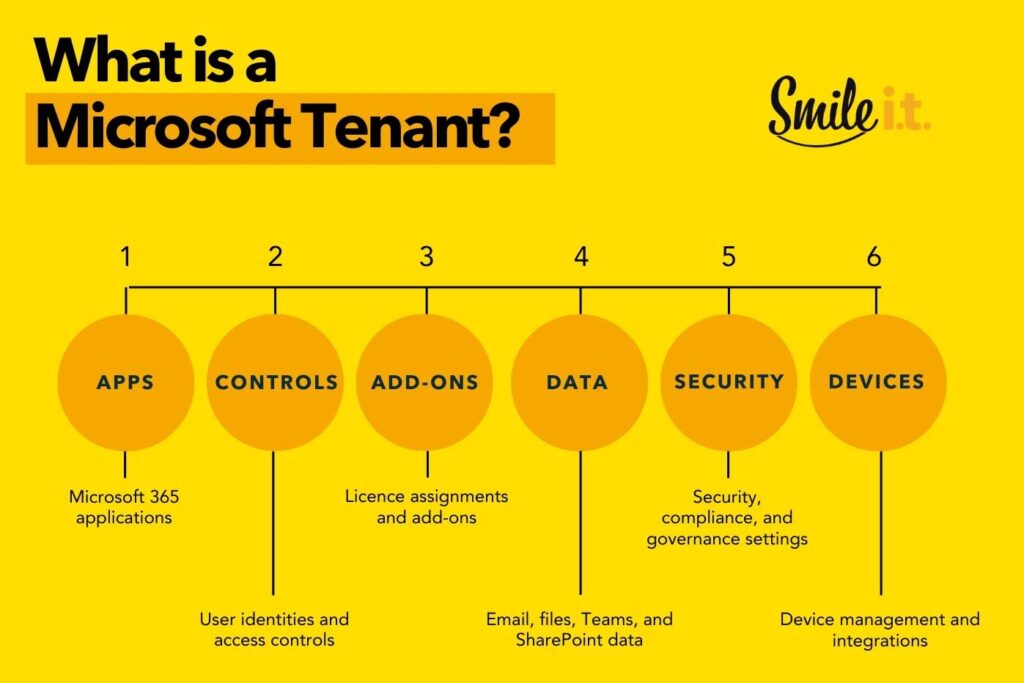
Your Microsoft tenant is the set of services assigned to your organisation – a dedicated cloud environment that everything sits on. ‘Everything’ entails:
- Microsoft 365 applications
- User identities and access controls
- Licence assignments and add-ons
- Email, files, Teams, and SharePoint data
- Security, compliance, and governance settings
- Device management and integrations
Your tenant license unlocks the Microsoft 365 features your business needs to operate.
What “Over-Licensed and Under-Used” Means
These two tenant alignment missteps often occur together. Making the distinction between the two can give you a more holistic view of your tenant’s licensing.
Over-Licensed
If your Microsoft tenant is over-licensed, you’re paying for capabilities that are unnecessary or unused. This can happen for a number of reasons – some of them appear early in your Microsoft 365 journey, others evolve as things change within your business. Here are some of the reasons your business can be over-licensed:
- Premium licenses were assigned to staff members without any justification for their role usage or requirements.
- Staff have left or become inactive and their licenses have been retained.
- Add-ons were purchased for a specific project, which has since ended but the add-on license has been retained.
- No formal license audits or reviews have been conducted.
Under-Used
This happens when features in your Microsoft tenant aren’t being used, even though they could be beneficial. This typically occurs when your tenant runs on default settings from the get-go. The biggest concern with this is related to security and governance. Having your security settings on default is likely not the safest approach for your business to take. Configuring advanced protections is a much more powerful route.
Here are some more of the telltale signs your Microsoft 365 tenant is underused:
- Conditional Access hasn’t been implemented.
- Devices aren’t being managed despite available licensing.
- Microsoft Defender has been enabled but features aren’t configured properly.
- Relying on manual onboarding and offboarding processes when there are ways to automate this.
- Using third-party tools when there are tools within your tenant that fulfil the same role.

Where License Misalignment Happens Most
It’s important to point out this isn’t a problem with the license itself – more with how the tenancy is structured and maintained.
Organisations can be paying for Business Premium for their entire team yet still treat it like a basic email license. The advanced security and device management features aren’t being used.
Similarly, businesses on Microsoft 365 Enterprise plans lack the internal capacity to manage advanced features. The plan’s complexity leads to avoidance rather than adoption.
A steady guiding hand from a managed service provider can be key to getting the right settings for your tenant, rather than resorting to defaults.
What are the Costs?
If you’ve got an over-licensed but under-used Microsoft tenant, what do the costs look like for your business? For a start, there’s the financial one. You’re paying for tools you aren’t using, which is licensing wastage. It’s not just the monetary hit, though – there are other costs involved:
- Unused security features increase the risk of a breach of your environment. This places your data, systems and processes at risk.
- You may be incurring increased admin overhead and greater pressure on your team by relying on manual processes when automated options are available in your tenant.
- Incorrectly configured access control can cause compliance issues and staff login problems.
- Productivity dips because the user experience isn’t as seamless as it could be.
When to Get a Microsoft Tenant Review
Here’s a small checklist to guide you as to whether it’s time for a Microsoft tenant review. If you answer yes to any of these, your tenant no longer reflects how your business operates.
- Your Microsoft spend has increased without a clear benefit.
- The business has grown, restructured, or merged.
- Other considerable staffing changes have occurred.
- You have recently migrated to Microsoft 365.
- Cyber insurance or compliance requirements have changed.
- IT management feels reactive rather than controlled.
How an MSP Can Right-Size Your Microsoft Tenancy
Whether you got off to a wrong start with your Microsoft tenant or your company has slowly drifted out of alignment with your licensing, there are steps you can take to get everything back on track.
Depending on what a tenant review reveals, the following could be applied:
- Mapping user roles to licence requirements
- Removing or downgrading licences where appropriate
- Reviewing add-ons and shutting down the unnecessary ones.
- Enabling features in your tenant that will allow you to shut down third-party tool usage.
- Mapping out a regular review cycle to ensure appropriate licensing into the future.
A managed IT services provider specialising in Microsoft 365 could be the perfect partner to guide you through a tenant review and the necessary corrective actions.
Contact Smile IT With Your Microsoft Tenant Questions
If you feel like you could be getting more out of your Microsoft 365 tenant, the Smile IT team is here to help. We can conduct a tenant review to determine whether you’re underusing the capabilities available to you or whether you’re over-licensed for your organisational needs. We’ll then guide you down the right path towards alignment. The result? Maximum value from your Microsoft tenant.
Let’s talk today!

When he’s not writing tech articles or turning IT startups into established and consistent managed service providers, Peter Drummond can be found kitesurfing on Moreton Bay or hanging out with his family!