Every day, Australian workers are hitting up public AI programs like ChatGPT with thousands of prompts. They ask them to summarise information, rewrite content, analyse data and speed up everyday tasks for them.
Our use of AI has grown faster than the controls around it.
That gap is what’s leading to our private data getting exposed in public AI systems. A report has found that 77% of employees share sensitive company data on ChatGPT. It’s not deliberate or malicious – it’s just team members trying to work as efficiently as possible.
Let’s look at ways business owners and management teams can control this usage while still harnessing the power of AI.
What Is Public AI
Public AI tools sit outside your organisation’s controlled IT environment. For comparison – many businesses using the Microsoft 365 stack will be turning to Microsoft 365 Copilot as their daily AI go-to. Copilot would be set up according to their business policies and positions, and trained on their company data. In an instance like this, Copilot is operating as an internal AI tool.
An external AI tool isn’t governed by your identity systems, security policies or data protection controls. It sits outside your organisation – think Perplexity and ChatGPT. If you put data into these tools, it’s no longer protected by internal policies. How it’s retained and used is determined by the provider.
This doesn’t outright mean those AI tools are unsafe. But it does mean some care has to be taken to keep your sensitive business information off them.
How Private Data Commonly Enters Public AI Tools
A routine task like summarising a meeting or drafting an email can lead to data leaking. It can happen at any time – a team member uploads a spreadsheet to an AI tool for summarisation or analysis. The spreadsheet contains operational details, internal decisions or client details. That information is now absorbed by the AI.
Contracts, proposals, and policies are frequently rewritten using AI. These documents often contain information that should be controlled. Similarly – customer complaints and support tickets often get pasted into LLMs. That’s information you want to keep out of the public domain.
Why Removing Names Is Not Enough
We got this query from a client recently: “What if we de-identify the information going into the AI by removing our name?”
Here’s the thing – removing your name doesn’t make the data safe, because the information still carries context. Things like workflows, pricing logic, service delivery models, or geographic focus. These will all help identify your business over time, so with repeated use of unregulated AI by multiple staff members, a broader picture of how your business operates will be painted.
To an AI tool, no data is sensitive data. It’s all treated and processed the same. This puts the responsibility and accountability for keeping data safe squarely on the shoulders of your business.
What About Paying for a Higher Tier?
This is another question that comes up a lot – if a user pays for a higher tier of a public platform like ChatGPT, won’t the increased security measures of the enterprise account make it safe?
The answer is that yes, you can significantly reduce risk by paying for enterprise tiers. However, your data is still leaving your tenancy. Even if the LLM isn’t going to be trained on your data, your sensitive information is still being shared with an external platform. That in itself is a security risk.
That’s the beauty of Microsoft Copilot for 365 – it exists within your 365 tenancy and all data stays within those boundaries.
Data That Should Never Be Used in Public AI Tools
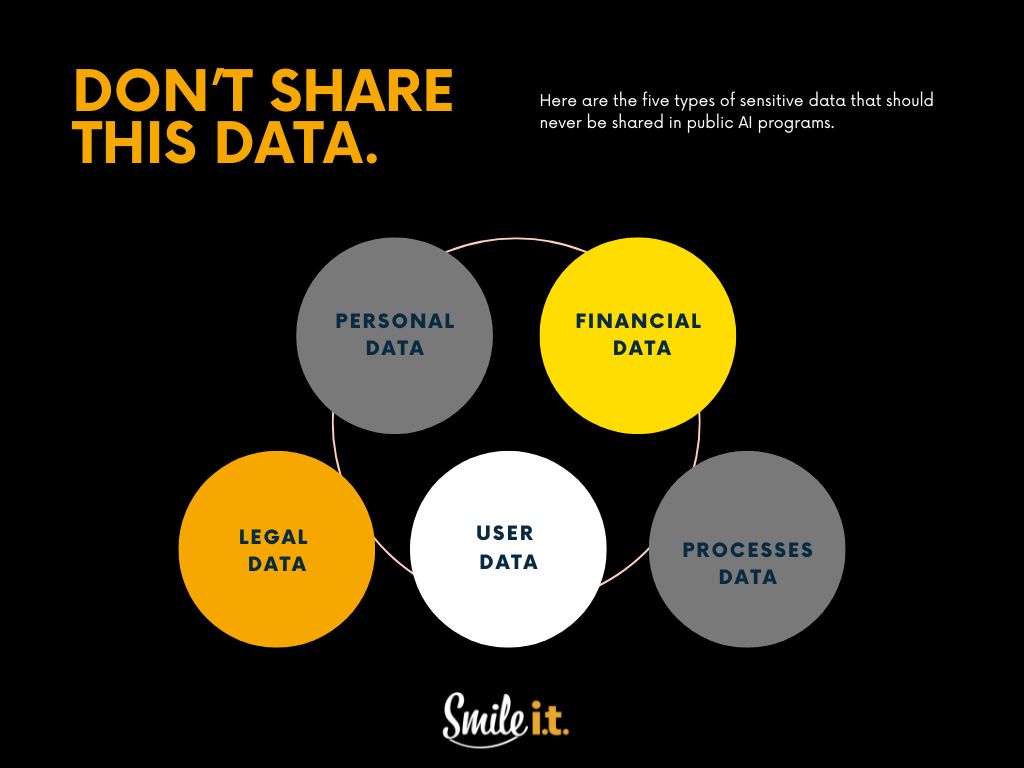
What data should be considered unsafe to inject into public AI tools? Reduce risk by placing clear boundaries around the use of the following data:
- Personal data – customers, employees or contractor information.
- Financial data – pricing models, forecasts, or internal performance figures.
- Legal data – contracts, legal documents and internal policies.
- Operations and user data – system details, credentials, access information, and infrastructure descriptions.
- Process data – proprietary processes, methodologies and intellectual property.
Stopping the Data Leakage
Reducing risk does not require removing AI from the workplace. It requires structure.
A clear AI usage policy is the foundation. The policy should define which tools are approved, what data can be used and what is prohibited. It should reflect how staff actually work.
Staff education is essential. Employees must understand what data cannot be shared and why. Consistent and practical training is the key – avoid the overwhelming and complex.
Approve and provide AI tools you’d like to be used, where possible. When businesses offer secure, business-grade AI platforms, staff are less likely to rely on public alternatives.
Ownership matters. AI usage should have a defined owner within the business, whether that sits with IT, security, or leadership. Unowned technology creates blind spots.
Technical Controls That Reduce Risk
Policy and training create the boundaries and structure for AI use in your business, and then implementing technical controls helps reinforce them.
This is what the technical controls look like:
- Identity and access controls to help ensure only authorised users can access approved AI platforms.
- Monitoring and logging provide visibility into AI usage.
- Data loss prevention controls can limit what information can be copied or uploaded from corporate systems.
- No personal AI accounts to be used for business tasks involving company data. In Australia, around 55% of workers admit to using personal AI accounts for business tasks – this needs to stop for data security to be assured.
A Practical Starting Checklist
Every business needs a starting point when it comes to regaining control over AI usage and stopping the data leakage. Here’s a simple checklist to kick it off:
- Do you know which AI tools staff are using for work tasks?
- Is there a documented policy explaining acceptable AI use?
- Have staff been trained on data boundaries?
- Are approved AI tools available and clearly communicated?
- Is someone accountable for AI governance?
If your answer to any of the above questions is a ‘no’, then there are going to be gaps in how your team uses public AI. These gaps can lead to serious data leakages – something every Brisbane business wants to avoid.
Level up Your AI with Microsoft Copilot
As a managed service provider, we’re always on the side of whatever technology makes our clients more productive and boosts their chance of success. AI is exactly that – but it needs to be managed carefully to avoid data leakage and even cybersecurity breaches.
Many of our clients make use of the Microsoft 365 stack, and we do too in the Smile IT office. Copilot has been a game-changer for them and us, becoming a significant part of our workflow across departments.
Once set up properly within your organisation, this is a secure AI tool that enhances workflows and boosts productivity. We’d love to tell you more about it. Get in touch with our team and let’s start to maximise the benefit of AI for your business.

When he’s not writing tech articles or turning IT startups into established and consistent managed service providers, Peter Drummond can be found kitesurfing on the Gold Coast or hanging out with his family!